


Kalshi App 2026: How It Works, Features & User Experience

Highlights


The Kalshi app has become one of the most distinctive trading tools in the U.S. market, thanks to its unusual position at the intersection of prediction markets and regulated financial exchanges. Instead of traditional sports bets or fantasy picks, the app allows users to trade event contracts, binary outcomes tied to real-world events, each settling at either $1 or $0. The result is a mobile experience that feels part stock market, part data-driven prediction tool, and part experimental financial product.
For anyone considering downloading it, the real questions are simple: How does the Kalshi app actually work? Is it safe? What features does it offer? And more importantly, is it worth using in 2026?

This in-depth review breaks down everything you need to know about the Kalshi app, how it performs on mobile, and what kind of user it’s best suited for.
What Is the Kalshi App?
The Kalshi app is the mobile version of Kalshi’s federally regulated event-contract exchange. It allows users to trade yes/no contracts on political outcomes, economic releases, sports, cultural events, weather patterns and more. Each contract trades between 1¢ and 99¢ and resolves at $1 if correct or $0 if wrong.
Unlike a sportsbook or sweepstakes app, the Kalshi app operates under CFTC oversight as a Designated Contract Market, placing it in the same category as regulated derivatives platforms. This federal oversight shapes everything about the app, from its interface to its liquidity, to how contracts settle.
For users, this means the Kalshi app is a legitimate U.S. platform, not an offshore service, not a crypto prediction market, and not a sweepstakes workaround.
How the Kalshi App Works
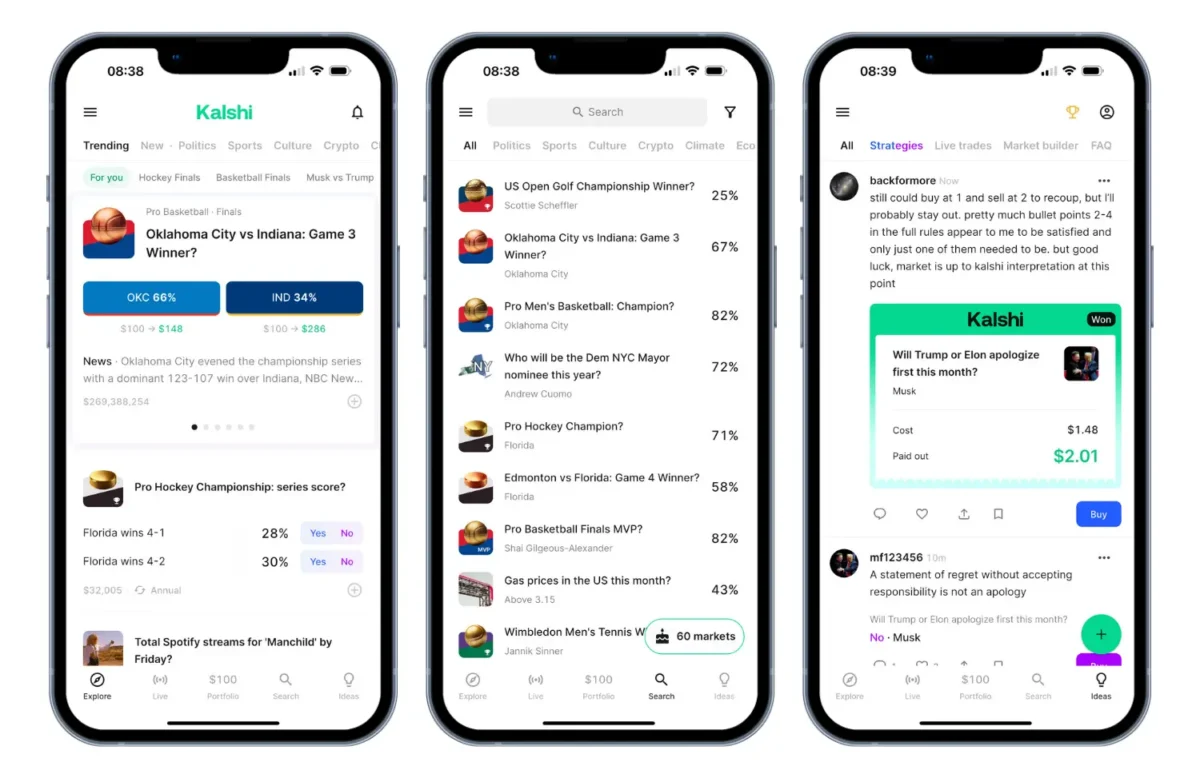
At its core, the Kalshi app allows you to speculate on real-world events by buying “Yes” or “No” contracts. The price of each contract represents the market’s probability of that outcome happening.
For example:
- A contract trading at $0.62 implies a 62% likelihood.
- If the event occurs, it pays $1.
- If the event fails, it pays $0.
Inside the Kalshi app, you can:
- Browse markets by category
- View price charts and trend lines
- Place limit or market orders
- Track open positions
- Manage deposits and withdrawals
- Receive settlement notifications
- Read contract specifications
- Follow live changes in probabilities
Because it works like a derivatives exchange, you aren’t betting against the house. You’re trading against other users in a central order book, meaning the Kalshi app acts as the matching engine and settlement platform.
Kalshi App Welcome Offer
New users who download the app can also claim Kalshi’s current welcome offer. New US customers aged 18+ can trade $25 and unlock $55 in trading credit by signing up with an eligible promo code. The credit is non-withdrawable, may expire after seven days, and the offer is not available in AZ, IL, MA, MD, MI, MT, NV, OH or WA.

Kalshi App Features
The Kalshi app has evolved significantly since launch, refining its layout, charting tools, order execution, and contract categories. Here are the standout features in 2026.
Clean, data-first interface
The Kalshi app prioritizes clarity. Markets are arranged by themes such as economics, politics, weather, culture and sports. Each market screen displays a simple chart, recent price changes, volume, and settlement rules. This is a noticeable departure from the algorithm-driven clutter of most trading apps.
Fast execution with limit & market orders
Users can choose between instant execution (market orders) or price-specific orders (limits). This brings the Kalshi app closer to traditional finance than the tap-and-bet feel of sportsbooks.
Transparent contract specs
Every contract includes a detailed specification explaining:
- How the outcome is defined
- What source determines settlement
- When the event resolves
- What counts as a qualifying result
This level of transparency is rare in prediction platforms and reinforces Kalshi’s regulatory backbone.
Watchlists & personalized feeds
The Kalshi app lets users save favorite markets, track trending categories, and follow markets that matter to them. This is particularly useful during high-volume cycles like elections or Federal Reserve weeks.
Intuitive deposit and withdrawal interface
Funding options include bank transfer (ACH), debit card, Apple Pay, PayPal, Venmo, wire transfer and crypto, with clear timelines shown in the app. Bank transfers are free, while debit card deposits carry a 2% fee. Withdrawals are straightforward, with bank transfers taking around 3-4 business days and debit card or crypto withdrawals typically arriving within 30 minutes.
Educational resources
The app links to Kalshi’s Help Center and beginner guides on probabilities and contract mechanics, helping beginners understand pricing before committing money.
Kalshi App User Experience
Using the Kalshi app on my iPhone 15 felt noticeably different from the type of experience I’m used to with sportsbook or trading apps. The first thing that struck me was the overall look: the color scheme leans into a deep navy base with contrasting white text and clean turquoise accents that guide your eye to active markets. On the iPhone 15’s bright OLED screen, everything looks sharp and high-contrast. It’s the kind of interface you don’t need to squint at, even when moving between indoor and outdoor light.
The loading time was another pleasant surprise. I tested opening the app from a cold start, and the home screen consistently appeared in under a second. Market pages load instantly; even the more data-heavy charts respond without the typical lag you get in prediction apps. You can scroll through categories with a smooth, almost weightless feel: no jitter, no stutter, no half-loaded tiles. It behaves like a polished fintech app rather than something experimental or hobbyist.
When you tap into a specific market, the transition animation is clean and almost imperceptible. The chart sweeps in with a soft fade, and the bid/ask boxes snap into place with precision. Even adjusting order sizes or toggling between “Yes” and “No” feels tactile, partly because the app uses subtle haptic feedback on the iPhone 15 to confirm actions. It’s small, but it makes the entire interface feel more deliberate, less like tapping buttons and more like inputting decisions into an actual trading engine.
What I appreciated most was that the app never tries to overwhelm you with graphic noise or promotional clutter. The typography is modern and minimalist, the spacing is generous, and the navigation bar sticks to a simple logic. Every category feels curated rather than crowded. You don’t have to fight through banners or pop-ups; you just tap what you need, and the app delivers the page instantly.
Placing an order is where the iPhone 15 performance really shines. There’s no perceptible input delay. You type a price, adjust size, and the preview updates in real time. The app uses bright green and red confirmations to distinguish buy vs. sell actions, and the moment you submit an order, the fill status updates practically instantly. It feels closer to trading on a light equities terminal than anything in the betting world.
Even moving between Wi-Fi and 5G didn’t cause hiccups, something I deliberately tested because real-world users bump into unstable networks all the time. The app never froze or required a force-close. At worst, I’d get a half-second spinning wheel while refreshing the market book, but it always caught up without reloading the screen.
Notifications on iOS are clean and surprisingly informative. When a contract settles, you don’t just get a “You won” or “You lost.” Instead, the app sends a concise message explaining the outcome source and the final settlement value. It behaves like a professional trading platform that assumes the user wants clarity, not dopamine hits.
Using the Kalshi app on an iPhone 15 gave me the impression of a platform that’s been engineered from the ground up with stability, clarity, and precision in mind. It’s fast, responsive, visually consistent, and free from gimmicks, a rare combination in a space where most apps are either overdesigned or underpowered.
How to Download the Kalshi App and Sign Up
Downloading the Kalshi app is quick whether you’re on iOS or Android. I installed it on my iPhone 15, and the download completed in moments. At around 130MB on iOS, it’s not the smallest app, but it loads fast and doesn’t require any awkward permissions.
Download the Kalshi App (iOS & Android)
iOS (iPhone / iPad): You can download the Kalshi app directly from the Apple App Store, where it holds a 4.8-star rating from more than 600,000 ratings. The app requires iOS 15 or later and is fully optimized for newer devices. It scales cleanly on the iPhone 15, with no stretched elements or UI glitches.
Android: Android users can get the app through the Google Play Store, where the installation process mirrors iOS. The interface and layout are nearly identical across both operating systems.
How to Sign Up on the Kalshi App

Once the app is installed, the signup process is smooth and intuitive. Here’s how it works step-by-step:
- Open the Kalshi app and tap Create Account.
- Choose whether you want to register using email, Apple, or Google login.
- Enter an eligible promo code if you want to claim the welcome offer.
- Enter your basic personal details.
- Provide your date of birth to confirm you meet the 18+ age requirement.
- Complete identity verification (KYC) by scanning a government ID and taking a quick selfie. This took under 60 seconds on the iPhone 15.
- Link a U.S. bank account or preferred funding method.
- Make your first deposit and explore the markets.
Once verified, you can immediately start browsing contracts, building a watchlist, and placing your first trades. The onboarding is one of the smoother flows compared with most trading or prediction-market apps, especially given the federal compliance requirements it must meet.
Kalshi App Availability & Legal Access
The Kalshi app is available in most U.S. states, though sports contracts are restricted in some states, and several others are in active litigation with Kalshi. Here is a recap of state availability as of mid-October 2026:
Kalshi App Legal States (2026)

The Kalshi app can be downloaded nationwide, but contract availability depends on where you’re physically located when you trade.
| Category | States |
|---|---|
| No Active Disputes | AL, AK, AR, CO, DE, FL, GA, HI, ID, IN, KS, LA, ME, MS, NE, NH, NM, NC, ND, OK, OR, PA, SC, SD, VT, VA, WV, WY, DC |
| Litigation or Review Pending (most markets still live) | AZ, CA, CT, IL, IA, KY, MD, MN, MO, MT, NJ, NY, RI, TN, TX, WI |
| Active Restrictions (mainly sports contracts) | NV, MI, WA, OH, UT, MA |
Kalshi App Safety & Security
Because Kalshi is regulated at the federal level, the Kalshi app meets strict security standards that most prediction platforms do not. These include:
- KYC identity verification
- Encrypted data and transactions
- Secure order routing
- Federally monitored market manipulation safeguards
- Segregated customer funds
- Transparent settlement sources
- Regulatory reporting and oversight
Users can trade knowing the app operates inside a clearly defined legal and regulatory framework, which is significantly safer than offshore markets or unregulated crypto-based prediction apps.
Kalshi App Pros & Cons
 Pros
Pros
- Regulated by the CFTC
- Clean, intuitive app design
- Fast order execution
- Transparent market rules
- Broad range of market categories
 Cons
Cons
- Not all states allow all markets
- Sports contracts face legal challenges
- Fees can add up during active trading
- Limited social features
- Not designed for casual betting-style users
The Kalshi app is best for analytical users who value clarity, regulation, and data-driven speculation, rather than entertainment-style wagering.
Gamble Responsibly
If you choose to use the Kalshi app, be mindful of your financial limits and decision-making. Event-contract trading carries risk, and it’s important to stay in control. You must be 18+ to use Kalshi.
Helpful principles:
- Set personal trading limits before you start.
- Avoid trading emotionally or chasing outcomes.
- Take breaks regularly and reassess your positions with a clear mind.
- Never trade with money you cannot afford to lose.
- Read contract specifications fully to understand settlement rules.
- Seek support if trading starts affecting your wellbeing.
Support resources:
- National Council on Problem Gambling
- GamTalk Support Community
- Gamblers Anonymous
- Financial Counseling Association of America
Final Verdict on the Kalshi App
After using the Kalshi app extensively, including testing it on an iPhone 15 for performance, usability, and day-to-day trading, it’s clear that the platform delivers a polished, high-trust experience that stands apart in the prediction and betting space. What you’re getting here is a real financial exchange wrapped in a clean, mobile-first interface that loads quickly, responds instantly to price changes, and stays consistent during major events.
Where many prediction apps feel chaotic or gimmicky, the Kalshi app feels deliberate, minimal, and engineered for people who want clarity over noise. It’s not built for mindless tapping or casino-style engagement; it’s built for users who treat events like data, not entertainment.
If you want a regulated, transparent, and intuitively designed way to speculate on real-world outcomes, the Kalshi app is one of the strongest options available in the U.S. in 2026.
Kalshi App FAQs
Is the Kalshi app safe?
Yes. It’s federally regulated and uses strict security standards comparable to major trading platforms.
Does the Kalshi app work on iPhone and Android?
Yes, it’s available on both the App Store and Google Play.
Do I need to verify my identity to use the app?
Yes. Kalshi requires full ID verification as part of its federal regulatory obligations.
Are all markets available in every state?
No. Most markets are available in most states, but some states, including Nevada, Michigan, Washington, Ohio and Utah, restrict sports-related event contracts.
How fast does the Kalshi app load?
On modern devices like the iPhone 15, page transitions and charts load almost instantly.
Does the Kalshi app charge trading fees?
Yes. Kalshi charges a fee on executed trades, calculated as roughly 0.07 × contracts × price × (1 − price), so fees are highest on contracts priced near 50¢. Some deposit methods, such as debit cards, also carry a fee.
Who is the Kalshi app best for?
It’s ideal for data-driven users who want a regulated way to trade event outcomes, rather than casual bettors.
18+ only. Trade responsibly. If you or someone you know has a gambling problem, call 1-800-GAMBLER.
 Table of content


