


Season › 2011-12 › News
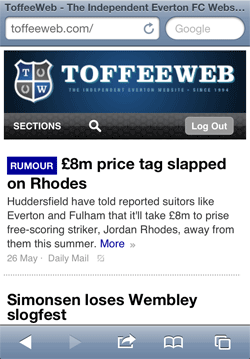
ToffeeWeb goes 'adaptive'
Better viewing on smaller screens
As the way people use the Web expands to more and more settings and devices, we've taken the next step in improving the experience of viewing ToffeeWeb on different screens.We were one of the first football sites to provide a dedicated mobile version but the recent advances in "adaptive web design" mean that we will increasingly be able to serve the same content you've become used to on the desktop to multiple devices and screen sizes.
[We say "increasingly" because retro-fitting a site as big as ToffeeWeb with 18 years of design and coding practices aimed at desktop monitors behind it is no small feat and it will take time to roll out across the site.]
What does this mean to me?
If you always use ToffeeWeb on a large screen, not much... unless you make your browser narrower to make room on your desktop, in which case you'll notice that the site will reflow at certain predetermined "viewport" widths.
(For example, pull your browser in until the player in the header area is closer to the "B" in the ToffeeWeb logo and you're now viewing the iPad/large tablet layout in portrait mode.)
Otherwise, apart from a slight tweak to the header area of the site where we've moved the login/logout links to below the navigation bar, you shouldn't notice much difference. If the site looks messed up and a few refreshes of the page don't fix things, let us know the Comments below or via the contact us form.
If you use an iPad or similar tablet (Galaxy, Kindle Fire, etc), we've shuffled the layout a little so that the pages should be easier to read.
And if you're on a smartphone or other similarly-small hand-held device, things will be customised further still, opening up the bulk of the site to you without being restricted to the narrow offerings on the dedicated mobile version. [NB: A word on comments below.]
Just be aware that right now, many pages need our attention for mobile users and some will require horizontal scrolling.
That dedicated m.toffeeweb.com mobile version is still available to you if you prefer it, but we will be working in the coming weeks to make more and more pages easy to use on small 320 pixel-wide screens.
Changes like this rarely go through without some teething problems so if things look horribly awry, first refresh the pages a few times and if that doesn't fix things, post it below or contact us and let us know the problem.
A word on commenting from mobile devices
Obviously, given the fact that the keyboards are small and fiddly, typing prose on handheld devices can be a pain in the arse but we ask you PLEASE to resist the urge to submit comments either in "txt-speak" or just badly formatted copy.
Anyone who has used the site for a while knows that we're anal about well-formatted comments and we will take steps to gate the submissions of members who persistently post in all lowercase, etc.
If something is worth submitting as a comment, it's worth formatting properly.
Thanks for your support and contributions to the site and let us know of any issues you come across.
Quotes or other material sourced from ToffeeWeb Team
Reader Comments (37)
Note: the following content is not moderated or vetted by the site owners at the time of submission. Comments are the responsibility of the poster. Disclaimer
2 Posted 26/05/2012 at 01:33:54
3 Posted 26/05/2012 at 02:03:25
4 Posted 26/05/2012 at 07:04:00
Correction, it's not just after submitting a post, the banner is missing from every page but the home page.I think I've managed to find that bug that was affecting Internet Explorer browsers from version 8 and earlier.
5 Posted 26/05/2012 at 07:33:42
6 Posted 26/05/2012 at 07:38:55
Also, is the open space either side of the margins different to how it was before? It shouldn't be much different on large screens... Just the one main ad space in the top right column and the smaller ones further down.
7 Posted 26/05/2012 at 07:38:47
Using an iMac5 with Lion os x with Safari as my browser. Also text box is moving slightly
8 Posted 26/05/2012 at 07:43:57
comment: EG the line below is the width I get
--------------------
It seems to move slightly
I've refreshed the page a few times and the space on the left is now as it was before
9 Posted 26/05/2012 at 07:43:10
10 Posted 26/05/2012 at 07:48:20
All okay now - I've noticed there's a facility to expand the width of the box.
Still have a slight hang but everything else is great
Thanks!
Editorial Team
11 Posted 26/05/2012 at 07:50:42
Rory, Kevin, if you're still having those issues after a few refreshes, could you email screenshots to webmaster@toffeeweb.com if you have a minute?
Thanks again.
12 Posted 26/05/2012 at 07:59:53
Sorry I'm using ancient technoilogy but it's all the company permits that's compatible with their IT systems!
13 Posted 26/05/2012 at 07:56:20
One suggestion? I understand only showing the three teams above and below us in the league table on the front page as the right hand column is chocka, but it's the bottom element on mailbag pages so could we afford to show a longer table? Quite often when reading discussions I like to refer to it to see how many points we're off a certain place and especially this season where there only a few points difference between relegation, mid-table and europe for most of the campaign, just looking at the six teams around us didn't tell the whole story.
14 Posted 26/05/2012 at 08:37:36
15 Posted 26/05/2012 at 09:02:38
16 Posted 26/05/2012 at 09:11:17
17 Posted 26/05/2012 at 09:14:06
18 Posted 26/05/2012 at 09:26:36
19 Posted 26/05/2012 at 09:27:38
20 Posted 26/05/2012 at 09:27:06
Just sit further back!!
21 Posted 26/05/2012 at 11:33:58
22 Posted 26/05/2012 at 16:16:47
Eric, did that solve your issue?
23 Posted 26/05/2012 at 17:00:25
In fact I can't do anthing with the page, such as 'zoom' in or out. And when I click a topic the width is waaaaaaaaay too wide in portrait and still too wide in landscape.
24 Posted 26/05/2012 at 18:05:02
No poll or text size options and the mailbag is halfway down a very long page.
Working fine on the lappy though, cheers lads :)
25 Posted 26/05/2012 at 19:25:35
No change Lyndon, whatever size A I touch on my iPhone it doesn't change the text.Yeah, it doesn't work on mine either. Not sure why but I'll add it to my bugs list.
It's odd that you're seeing this, though:
. And when I click a topic the width is waaaaaaaaay too wide in portrait and still too wide in landscape.
I tested the mobile version on the iPhone and it works great on these article pages.
One thing you could try ? and this goes for anyone having persistent problems since the change ? is going to this page which will remove all your ToffeeWeb cookies, including those related to the size of your screen and text-size options. It'll take you back to the login screen where you can log in again.
26 Posted 26/05/2012 at 22:58:05
27 Posted 26/05/2012 at 22:58:05
28 Posted 27/05/2012 at 01:15:28
29 Posted 27/05/2012 at 01:52:27
Editorial Team
30 Posted 27/05/2012 at 06:11:16
31 Posted 27/05/2012 at 06:38:19
32 Posted 27/05/2012 at 17:25:59
Just on the iPad the toffee web logo has a small one on top of a bigger one..looks little messy. But otherwise the feel is excellent.
33 Posted 27/05/2012 at 19:14:55
34 Posted 27/05/2012 at 20:10:11
35 Posted 27/05/2012 at 20:01:24
36 Posted 27/05/2012 at 20:35:59
37 Posted 29/05/2012 at 21:39:27
Add Your Comments
In order to post a comment, you need to be logged in as a registered user of the site.
Or Sign up as a ToffeeWeb Member — it's free, takes just a few minutes and will allow you to post your comments on articles and Talking Points submissions across the site.
1 Posted 26/05/2012 at 01:41:09
I had a problem opening the webpage when typing in the address but have now gotten it to load using an old link.
It now seems to load quickly and then flash off and back on again.
After submitting a post the banner at the top of the page is missing and the page flashes a few times before settling down.